A first website runs fine on ordinary shared hosting with 5-10 GB of disk, PHP 8, free SSL and automatic backups: on our test bench a fresh WordPress 7.1.4 took 105 MB, and 160 MB together with WooCommerce. Beginners usually overpay not for resources but for renewals: for example, Hostinger’s entry plan renews at 3.8 times its first-term monthly price, so compare the cost over 3 years, not the price of the first month.
How we checked
Resources: on 10 November 2026 we installed WordPress 7.1.4 and WooCommerce 11.2.2 on a test bench (Ubuntu 24.04 container, nginx 1.24, PHP 8.3 FPM, MariaDB 10.11) and measured the size and number of files, the database size and peak PHP memory on typical pages. These are not measurements on RichHost servers. Prices: the same day we collected them from the official plan pages of Hostinger, HOSTiQ, Cityhost, Hyperhost and Mirohost (links in the table); the Ukraine.com.ua data come from our review, checked against the official site on 25.10.2026. All six sell hosting to customers in Ukraine, so prices are shown in the currencies they publish there (UAH, USD, EUR). Approximate UAH totals use the National Bank of Ukraine rate of 09.11.2026: 45.32 UAH per US dollar and 50.65 UAH per euro.
How many resources a first site really needs
We installed WordPress from scratch, then added WooCommerce, created 20 test products and uploaded one photo. Here is the shortened command output:
$ du -sm --apparent-size www ; find www -type f | wc -l
105     www
3736
$ wp plugin install woocommerce.zip --activate
Success: Installed 1 of 1 plugins.
$ du -sm --apparent-size www ; find www -type f | wc -l
160     www
9234
MariaDB> SELECT ROUND(SUM(data_length+index_length)/1024/1024,2), COUNT(*)
         FROM information_schema.tables WHERE table_schema='wp';
0.70  12    # clean WordPress
2.63  48    # after activating WooCommerce
We recorded peak memory with a small plugin that saves memory_get_peak_usage() at the end of every request. Each page was opened three times and we took the repeat values.
| What we measured | WordPress 7.1.4 | WordPress + WooCommerce 11.2.2 |
|---|---|---|
| Site files | 105 MB | 160 MB (170 MB with 20 products and one photo) |
| Number of files (inodes) | 3,736 | 9,234 |
| Database | 0.70 MB, 12 tables | 2.63 MB, 48 tables (3.11 MB with products) |
| PHP memory per request, OPcache on | 6-9 MB | 13-24 MB |
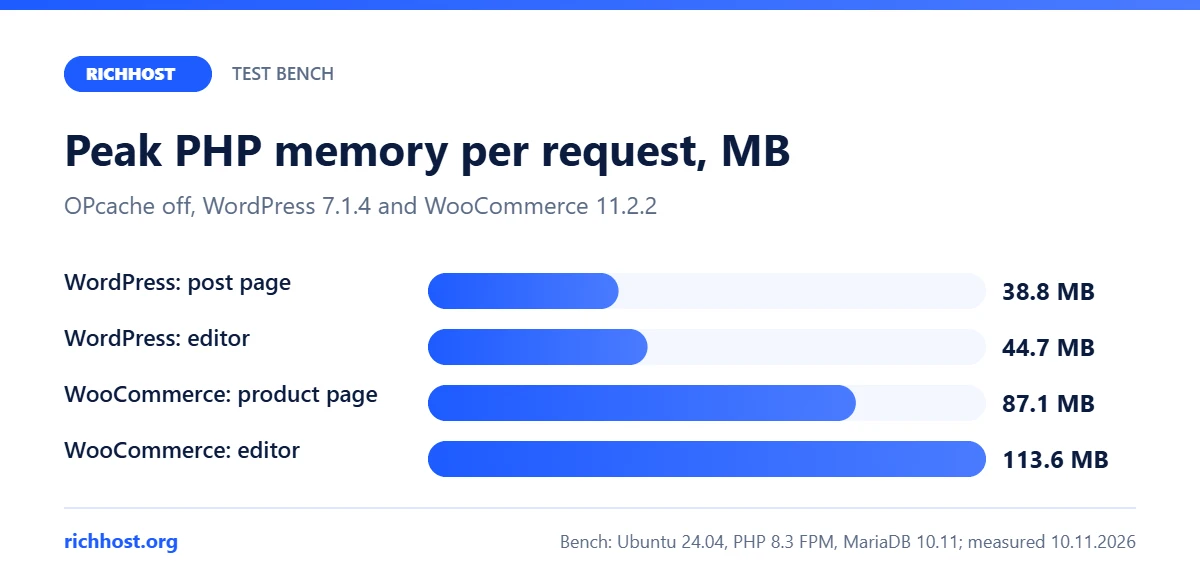
| PHP memory per request, OPcache off | 39-45 MB | 87-114 MB |
| SQL queries per page | 34-60 | 86-165 |
What this means for choosing a plan:
- Disk. The CMS itself takes 0.1-0.2 GB, so even 3 GB is formally enough. The space goes to photos, email and archives, not to WordPress.
- Number of files. A WooCommerce store has more than 9,000 files right after installation. If a plan limits inodes, this number matters more than gigabytes.
- PHP memory. A blog or business card site is fine with a
memory_limitof 128 MB. The WooCommerce product editor needed 114 MB without OPcache, so for a store look for a plan with a PHP memory limit of 256 MB or more.
Photos take more space than you think
We uploaded one 4000×3000 pixel image of 5.0 MB. WordPress kept the original, a copy scaled down to 2560 pixels and nine more sizes for themes and WooCommerce: 11 files and 10.4 MB in total. The image was synthetic and real photos compress better, but the proportion holds: every phone photo takes about twice its file size on disk. A hundred such photos without compression already add up to about a gigabyte.
First payment and renewal: entry plans compared
We took the entry plans that someone with a first site usually looks at, from providers that sell to customers in Ukraine. Prices were checked on 10.11.2026 and may change, so open the provider’s page before ordering. In other markets the numbers differ, but the pattern of promo price, prepayment term and renewal is the same.
| Provider and plan | What is included | First payment | Renewal | Approx. over 3 years |
|---|---|---|---|---|
| Hostinger, Single | 10 GB SSD, 1 site, 1 mailbox, weekly backup, SSL | UAH 39/month only when paying for 48 months: UAH 1,872 excluding VAT | UAH 149/month for the same term | UAH 1,872, but for 4 years at once; the next 4 years UAH 7,152 |
| Hostinger, Premium | 20 GB SSD, 3 sites, weekly backup, SSL, domain for 1 year | UAH 69/month for 48 months: UAH 3,312 excluding VAT | UAH 229/month | UAH 3,312 for 4 years; then UAH 10,992 |
| HOSTiQ, HQ10 | 25 GB SSD, 10 sites, 500 mailboxes, cPanel, backup every 3 days; free SSL Essential not included | $7.67 monthly, $73.58 per year | no separate price, 20-30% off for longer terms | $193.16 for 3 years in total (about UAH 8,750) |
| Cityhost, SSD Start | 10 GB SSD, 10 GB of mail, nightly backups; number of sites not stated on the page | from UAH 136.08/month (regular price UAH 216) | UAH 151.20 or 172.80/month (in different blocks of the page) | UAH 5,260-5,780 if the discount covers the first year |
| Hyperhost, Basic | 5 GB SSD, 3 sites, daily backups, cPanel or ISPmanager, Let’s Encrypt | $3.29 monthly, $2.50 per month when paying for 2 years | no separate price, 12% off for a year and 24% for 2 years | $94.74 (2 years + 1 year, about UAH 4,290) |
| Mirohost, Mini | 3,000 MB, 1 site, 100 mailboxes, PHP 256 MB, backups restorable for up to 15 days | from UAH 273/month | not stated on the page | from UAH 9,828 |
| Ukraine.com.ua, Shvydkyi | 10 GB NVMe, 1 site, 512 MB RAM, adm.tools panel | €62.28 per year (from €4/month, €7 paid monthly) | not published separately | €186.84 (about UAH 9,460) |
| RichHost, A3 | NVMe, unlimited sites and mailboxes, our own control panel with an AI assistant, Let’s Encrypt, continuous cloud backups | $8/month, 10% off for yearly payment | at the plan price | $259.20 when paying yearly (about UAH 11,740) |
The main thing the table shows: the lowest price on a banner does not mean the smallest sum over several years. At Hostinger, UAH 39 a month applies only if you pay for 4 years at once, and renewal costs UAH 149, 3.8 times more; the prices on the page are also shown without VAT. At Cityhost the “from” price is 37% below the regular one, but the term it is tied to is not stated, and the page shows the renewal price in two versions, so confirm it with support. HOSTiQ and Hyperhost have no separate promo price: it only gets cheaper with a longer payment term. The Ukraine.com.ua figures come from our Ukraine.com.ua hosting review, which lists both yearly prices and limits from the provider’s rules. This is exactly why choosing hosting by price alone backfires.
Also compare what the price includes. HQ10 has no free SSL Essential, Hostinger Single has only one mailbox and a weekly backup, Mirohost Mini has a 3 GB disk. We explain what makes up the price of hosting in a separate guide.
What to check in a plan besides the price
- Renewal price and minimum term. Look on the plan card for a line like “renews at” or “price for 48 months”.
- Backups. How often they are made, how many days they are kept and whether you can restore the site yourself, without writing to support.
- SSL. Free Let’s Encrypt certificates are quite enough for a business card site, a blog or a small store. A paid certificate is rarely needed at the start.
- Email on your domain. If every employee needs a mailbox, a limit of 1-2 mailboxes quickly becomes a problem.
- Panel and auto-installer. Check that you can install WordPress with an auto-installer rather than by hand. Hosting control panels differ in features, but for a beginner a clear interface matters most.
- Hosting type. A VPS is overkill for a first site: you would have to update the system and look after security yourself. If in doubt, read about how hosting types differ.
What to choose: decision table
| If you have | Choose | Why |
|---|---|---|
| One business card site or blog, and you are ready to pay for 1-2 years | An entry plan with 3-5 GB and daily backups, for example Hyperhost Basic | WordPress takes 105 MB, so there is room for hundreds of photos; the smallest 3-year total among plans without a 4-year prepayment |
| You need the smallest one-off payment and are sure the site will live 4 years | Hostinger Single or Premium | The lowest monthly price, but 48 months paid at once and a renewal 3-4 times more expensive |
| You are not sure the project will launch at all | Monthly payment or a trial period (HOSTiQ: 30 days with a promo code) | Overpaying for one month costs less than money frozen for years |
| A small WooCommerce store | A plan with a PHP memory limit of 256 MB or more, daily backups and spare inodes | On the bench the product editor used 114 MB without OPcache, and the store has more than 9,000 files |
| Several sites and email on your domain for a team | A plan with room for sites and mailboxes: HOSTiQ HQ10 (10 sites, 500 mailboxes) or RichHost A3 (unlimited sites and mailboxes) | You will not have to upgrade because of a third site or a new employee |
| Visitors in Europe or the USA | A provider with servers in that region | A closer server means lower latency on every request |
RichHost has been an international provider since 2003, with servers in Europe and the USA (4 data centers), and sells shared hosting and domains. Support answers from 10:00 to 20:00 Kyiv time, usually within 30 minutes. All RichHost hosting plans include NVMe disks, unlimited traffic and free SSL.
How beginners most often overpay
- They pay for 4 years in advance to get the low price, then move to another host after a year and lose the rest.
- They take a “free domain for the first year” and do not look at the domain renewal price from the second year.
- They buy a paid SSL certificate for a blog, although free Let’s Encrypt is enough.
- They count only the hosting. To build a full yearly website budget, add the domain, email and paid plugins.
The domain and the hosting do not have to come from the same company: if the domain is registered elsewhere, you only change the domain nameservers to your host’s. For a beginner it is still easier to buy both in one place, with fewer DNS settings to get wrong.
FAQ
How much disk space does a first site need?
For a business card site or a blog on WordPress 5 GB is enough; for a site with lots of photos 10 GB is better. Apart from the 105-160 MB of the CMS itself, the space goes to images, email and backups.
Is a 1 GB plan enough?
To launch, yes, but the margin is very small: one 5 MB photo takes about 10 MB after uploading to WordPress. A hundred photos fill such a disk, so 1 GB suits only simple pages without galleries.
How much RAM does WordPress need?
On hosting, what matters is the PHP memory limit per process. Plain WordPress on the bench stayed within 45 MB even without OPcache, while WooCommerce needed up to 114 MB. So 128 MB is enough for a blog, and 256 MB is better for a store.
Is it worth paying for several years at once?
Only if the renewal price does not jump several times and you trust the provider. Work out the 3-year total including renewal and compare it with yearly payment: the difference is often smaller than the banner promises.