


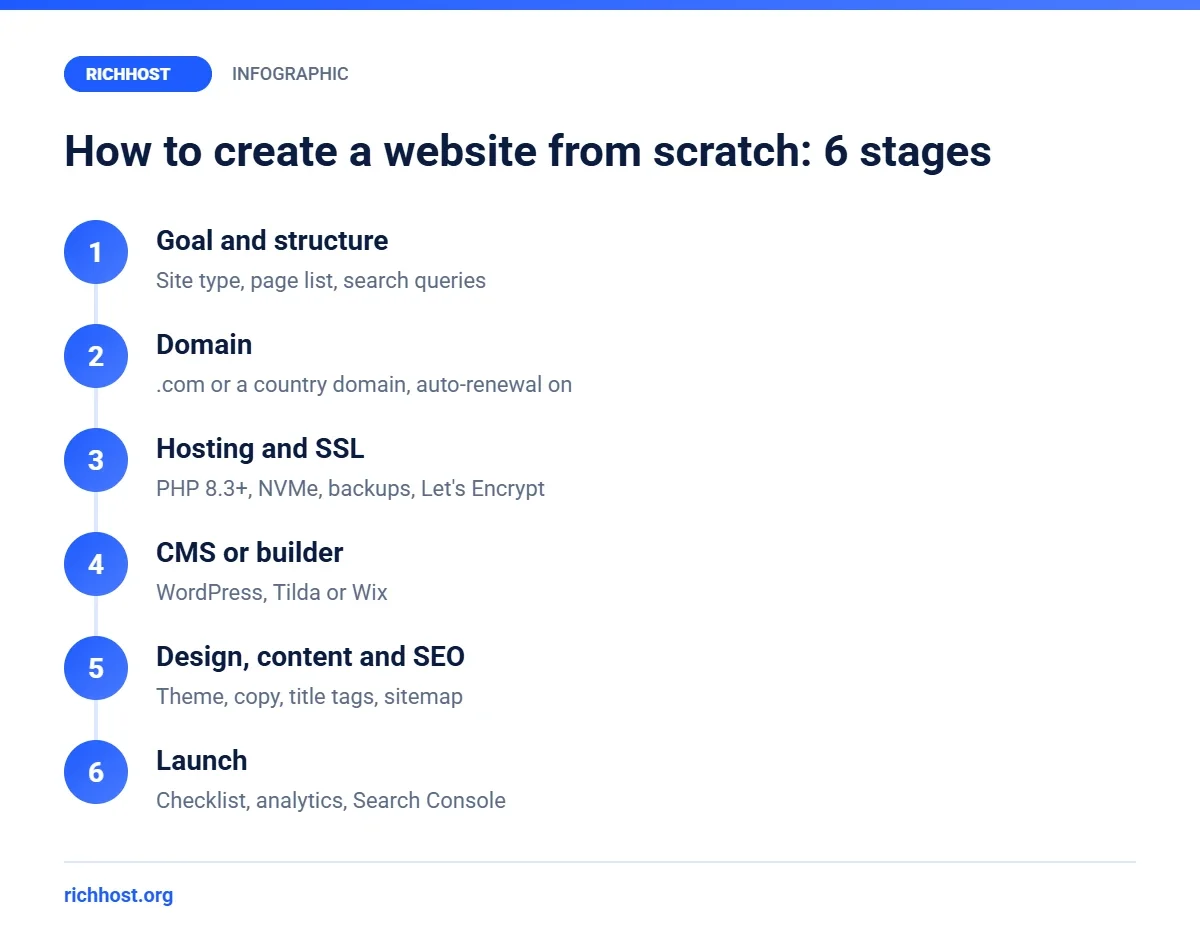
To create a website from scratch, work through six stages: define the goal and structure, register a domain, order hosting, install a CMS (usually WordPress) or pick a website builder, prepare the design and SEO-ready content, then launch after checking SSL, analytics and Google Search Console. A business card site or a blog can be built on your own in 1-2 weeks, and the mandatory costs are roughly $90-95 per year: a .com domain plus shared hosting. Below: timelines, prices as of October 2026 and verification commands.
Step-by-step plan: stages, timelines and costs
Timelines are approximate for one person building a first site. Content, not the technical setup, usually takes the most time.
| Stage | What to do | Time (approx.) | Cost |
|---|---|---|---|
| 1. Goal and structure | Choose the site type, list pages and target search queries | 1-2 days | $0 |
| 2. Domain | Pick a name and extension, register it, enable auto-renewal | 15 minutes to 1 day | .com about $11-19 per year |
| 3. Hosting | Order a plan, point the domain, enable SSL | 1 hour to 2 days (DNS update) | from $86.40 per year (RichHost A3, paid yearly) |
| 4. CMS or builder | Install WordPress or set up Tilda or Wix | 15 minutes to 1 day | WordPress is free, builders from $10 per month |
| 5. Design, content and SEO | Theme, logo, copy, photos, meta tags, sitemap | 3-10 days | $0-59 per year (premium theme) if you write the copy |
| 6. Launch | Checks, backup, analytics, Search Console | 1 day | $0 |
Stage 1. Goal, site type and structure
Before buying a domain, decide what a visitor should do (call, send a request, buy, read) and who your audience is. That defines the site type and the technology.
- Landing page: one page for one offer. Fastest to launch, little search traffic.
- Business card site: 5-10 pages: home, services, prices, about, contacts.
- Blog: dozens or hundreds of articles, so a convenient CMS and speed matter.
- Online store: catalog, cart, payments and shipping. Needs the most time and resources.
Then list the pages with one main search query each. Google Ads Keyword Planner shows demand, and the top Google results show what users expect. A minimal business site has a home page, service or product pages, prices, about, contacts with address and phone, and a privacy policy. If you sell to consumers in Ukraine, Article 27 of the state language law requires a Ukrainian version that loads by default.
Stage 2. Choosing and registering a domain
A domain is your site address, paid yearly. A good name is short, easy to dictate, free of hyphens and confusing digits, and does not infringe a trademark.
- .com: the default for an international audience, about $11-19 per year at international registrars as of September 2026.
- Country domains (.com.ua, .pl, .de and others): when you target one country. In Ukraine, .com.ua is open to anyone, while .ua requires a registered trademark.
- New extensions (.shop, .online): when your name is taken elsewhere. Check the renewal price: the first year is often discounted.
Registrar prices by extension are compared in our guide on how much a domain costs. You can check whether a name is free and register a domain with RichHost. Turn on auto-renewal: an expired domain is a common reason a site suddenly disappears.
Stage 3. Hosting and connecting the domain
Shared hosting is enough for a first WordPress site; a VPS is needed for your own software or when the site keeps hitting plan limits. Check before ordering:
- Software versions. WordPress officially recommends PHP 8.3 or newer, MySQL 8.0+ or MariaDB 10.11+, and HTTPS support.
- Disk type. NVMe speeds up the database and reduces server response time.
- SSL. A free Let’s Encrypt certificate with automatic renewal.
- Backups. How often, how long they are kept, self-service restore.
- Server location close to your audience.
- Control panel with email, databases and one-click CMS install, and the renewal price, not just the first month.
For example, the RichHost A3 plan costs $8 per month, or $86.40 per year with the 10% yearly discount. All plans include NVMe disks, unlimited traffic, unlimited sites and mailboxes, our own control panel with an AI assistant, free SSL, and servers in Europe and the USA. Resource requirements for different site types are covered in our WordPress hosting guide.
How to connect the domain to hosting
There are two ways. Either change the domain nameservers (NS) to the ones your host sent after the order, so the host manages all DNS records, or keep DNS at the registrar and create an A record with the server IP plus a CNAME for www. If DNS is new to you, read what happens when you type a site address into a browser.
dig +short NS example.com     # domain nameservers
dig +short A example.com      # IP the domain points to
dig +short A www.example.com  # is www configured
nslookup example.com          # the same on Windows
A nameserver change usually takes effect within a few hours but can take up to 24-48 hours, while an A record change depends on its TTL. Once the domain points to the server, open its settings in your hosting control panel, enable SSL with a Let’s Encrypt certificate and turn on automatic HTTPS redirection. How free certificates differ from paid ones is explained in our article on SSL certificate cost.
Stage 4. CMS or website builder
A CMS (content management system) lets you edit pages without coding. According to W3Techs (checked 29.10.2026), WordPress runs 39.5% of all websites and 58.3% of sites with a known CMS. The alternatives are builders like Tilda and Wix, where hosting is part of the subscription, or a static HTML site. Joomla and Drupal also run on shared hosting but are installed manually: see our Joomla hosting and Drupal hosting pages.
| Criterion | WordPress on hosting | Tilda | Wix | Static HTML |
|---|---|---|---|---|
| Platform price | Free, you pay only for hosting | Free without custom domain; Personal $10/mo yearly or $15 monthly | Free with Wix ads; Light from $17/mo yearly | Free |
| Skills needed | Basic, no code | Minimal | Minimal | HTML, CSS, ideally Git |
| Online store | WooCommerce (free plugin) | Catalog and cart on paid plans | From Core plan, no payments on Light | Only via external services |
| Moving to another provider | Full: files and database | Code export only on Business ($20-25/mo) | Not possible, content is moved by hand | Full |
Builder prices are from the official Tilda and Wix pricing pages (checked 29.10.2026); Wix prices vary by country. For a site that will grow, WordPress on your own hosting is the most flexible: you own it and can move it anywhere. A builder suits a landing page or portfolio that must go live in a day.
Installing WordPress
In most control panels, WordPress is installed with a one-click installer: choose WordPress for your domain, enter the admin details, and the panel creates the database. With SSH access, WP-CLI does the same:
cd ~/web/example.com/public_html
wp core download
wp config create --dbname=user_wp --dbuser=user_wp --dbpass='DB_PASSWORD'
wp core install --url=https://example.com --title="Site name" \
  --admin_user=owner --admin_email=you@example.com
wp rewrite structure '/%postname%/'
Without --admin_password, WP-CLI generates a password and prints it. The last command enables readable URLs like /services/ instead of ?p=123. Both methods are described in detail in our guide to install WordPress on hosting.
Stage 5. Design, content and basic SEO
A first site does not need custom design: pick a ready theme and adapt colors, fonts and logo. Lightweight themes such as GeneratePress, Astra or Kadence have free versions, while GeneratePress premium features are now sold only in the GeneratePress One bundle, from $99 per year for one site (checked 29.10.2026).
- Check every page on a phone.
- Compress images and upload WebP or AVIF: WordPress supports both.
- Keep plugins minimal: an SEO plugin (Yoast SEO or Rank Math), caching, backups, form spam protection and login attempt limits.
- Test speed in PageSpeed Insights. Good Core Web Vitals: LCP under 2.5 s, INP under 200 ms, CLS under 0.1.
Write copy that answers what you do, what it costs and how to order; use real photos and visible contact buttons. If forms collect personal data, publish a privacy policy. Basic SEO before launch:
- One main query per page, used in the H1, the title tag (up to 60 characters) and the first paragraph.
- A 140-160 character meta description with a clear benefit.
- A sitemap: WordPress 5.5+ creates /wp-sitemap.xml, and an SEO plugin replaces it with its own (/sitemap_index.xml in Yoast SEO).
- For a local business, a Google Business Profile with the same name, address and phone as on the site.
Stage 6. Launch checklist and the first weeks
- Remove the indexing block if you enabled it during development: “Search engine visibility” under Settings > Reading.
- The site opens over HTTPS, and http and www versions redirect with a 301 to one main address.
- Forms really deliver email. To keep domain mail out of spam, set up SPF, DKIM and DMARC.
- A backup is made and automatic backups are on.
- Analytics (for example, Google Analytics 4) and Google Search Console are connected: add a Domain property, verify it with a DNS TXT record and submit the sitemap.
curl -sI http://example.com | grep -i -E "^HTTP|^location"
# expected: HTTP/1.1 301 ... location: https://example.com/
curl -sI https://www.example.com | grep -i -E "^HTTP|^location"
curl -s https://example.com/robots.txt
dig +short TXT example.com    # is google-site-verification there
In the first weeks, watch the Pages report in Search Console and use URL Inspection to request indexing of key pages. Keep WordPress and plugins updated, set up uptime monitoring and keep adding useful content.
Budget and timelines: three scenarios
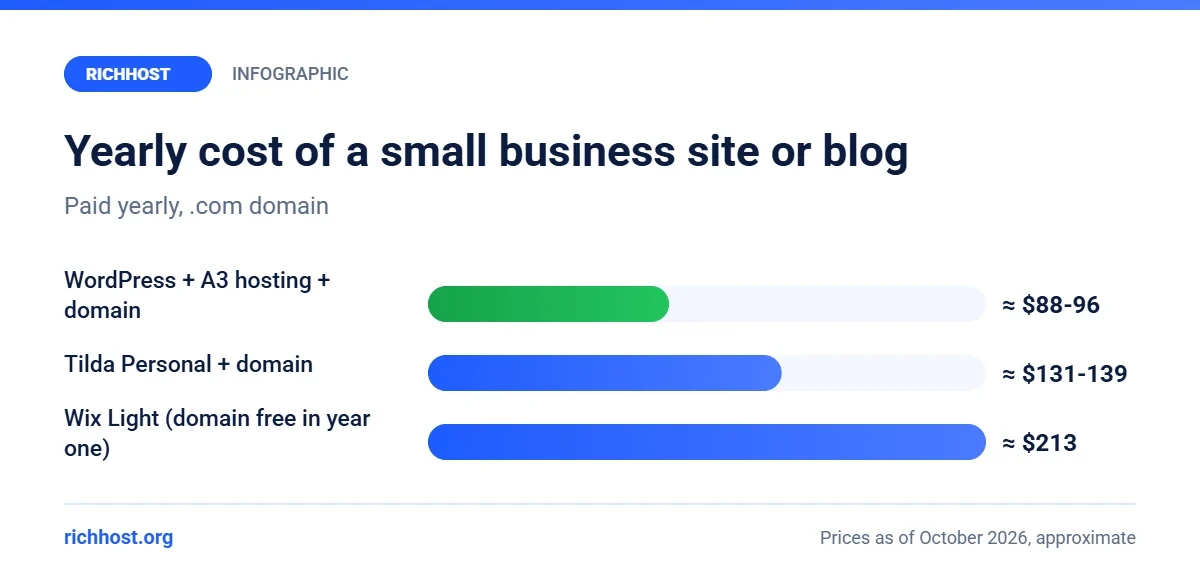
Only two costs are mandatory: the domain and hosting (builders include hosting in the subscription). Yearly payment, prices as of October 2026, .com domain about $11-19:
| Scenario | One-time costs | Yearly costs | Time to launch (approx.) |
|---|---|---|---|
| WordPress on shared hosting, do it yourself | $0 (optional premium theme, e.g. GeneratePress One from $99/yr) | ≈ $97-105: hosting A3 $86.40 + .com domain | Card site 3-7 days, blog 1-2 weeks, store 3-6 weeks |
| Tilda Personal | $0 | ≈ $131-139: $120 subscription + domain | 1-5 days |
| Wix Light | $0 | ≈ $213 in year one with a free domain, then plus the domain price | 1-5 days |
| Turnkey development (freelancer or agency) | Per estimate (pages, design, features) | Hosting, domain, support | Usually several weeks |
Paid plugins, copywriting and ads can wait. A full breakdown of recurring payments is in our article on website maintenance cost per year, and what drives plan prices is explained in the web hosting cost guide. If you hire developers, ask for 2-3 quotes on the same brief and always register the domain and hosting in your own name.
How we checked. On 29.10.2026 we checked the figures in this article against primary sources: the WordPress share against W3Techs, Tilda, Wix and GeneratePress prices against their official pricing pages, and RichHost prices against the official plans page. Timelines in the tables are estimates.
FAQ
Can I create a website for free?
Yes, with limits: free plans give you a subdomain, platform ads and strict quotas. A business needs at least its own domain and paid hosting or a subscription.
How long does it take to build a website from scratch?
Roughly: a card site a few days to a week, a blog 1-2 weeks, a WooCommerce store 3-6 weeks. No coding skills are required for WordPress or builders.
When will a new site appear in Google?
Usually within a few days to a few weeks. A sitemap in Search Console and indexing requests for key pages speed it up.
Can I move the site to another host later?
A WordPress site moves completely. Tilda exports code only on the Business plan, and a Wix site can only be rebuilt elsewhere.
Conclusion
Six steps take you from idea to a live site. For most projects the simplest working setup is a .com domain and WordPress on shared hosting: around $97-105 per year with full control over the site. When you are ready, compare RichHost hosting plans with NVMe disks, our own control panel with an AI assistant and free SSL, install WordPress in one click and follow this plan.
