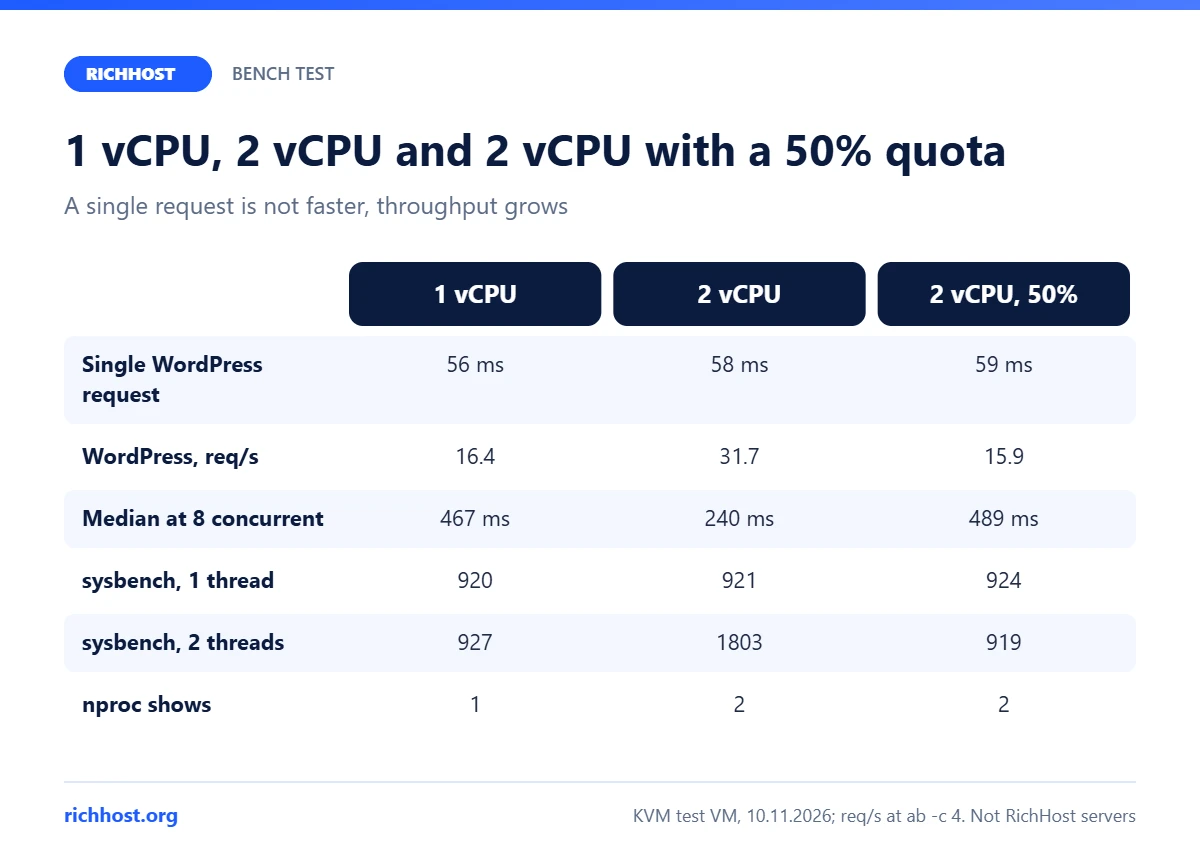
On most VPS plans a vCPU is one hardware thread (hyperthread) of a physical core, not a whole core, and on shared vCPU plans that thread is also shared with other virtual machines. More vCPU does not make a single PHP request faster: on our test bench a WordPress page took 56-58 ms on both 1 and 2 vCPU, but the server handled twice as many requests per second. You can check what you really got in about 10 minutes with nproc and lscpu, the steal column in top or vmstat, and sysbench cpu with one thread versus several.
How we tested
On 10 November 2026 we ran sysbench 1.0.20, PHP 8.3 with OPcache, nginx 1.24, MariaDB 10.11 and WordPress 6.4.3 (20 posts) on a KVM test VM (Ubuntu 24.04, 2 vCPU Intel Xeon 2.1 GHz, 8 GB RAM). We emulated “1 vCPU”, “2 vCPU” and “neighbours take 50% of the time” with cgroups: CPU pinning (cpuset) plus a CPU time quota (the equivalent of cpu.max). Four vCPU cannot be emulated on this machine, so 4 threads only show an overloaded 2 vCPU. Each run lasted 5 seconds and we logged the load average before every run. We checked the vCPU definitions in the AWS, DigitalOcean and Hetzner documentation on the same day. These are test bench numbers, not RichHost server numbers.
Core, thread and vCPU: what providers say
A physical core executes instructions. Hyper-Threading (Intel) or SMT (AMD) lets one core run two threads, but the two threads share the core’s execution units and cache, so two threads are not two cores. The big clouds state plainly that their vCPU is a thread:
| Provider | What a vCPU is in the docs | Shared and dedicated vCPU |
|---|---|---|
| AWS EC2 | Each thread of a core is presented as a vCPU; their m5.xlarge example has 2 cores with 2 threads each, so 4 vCPU | The T family (T3, T3a, T4g, T8i) has a baseline CPU level with the ability to burst above it |
| DigitalOcean | A vCPU corresponds to one hyperthread on a processor core | Basic: the thread may be shared with other Droplets. General Purpose and CPU-Optimized: guaranteed access to the full thread |
| Hetzner Cloud | Plan pages and docs do not say whether it is a core or a thread | Cost-Optimized and Regular Performance: resources shared with “neighbours”. General Purpose: dedicated vCPU (docs) |
In practice, 4 vCPU usually means 2 physical cores, or less if the threads are shared. Compare plans by vCPU type, not just count; we covered the price impact in our guide to VPS prices by vCPU.
Steal time and quotas: where CPU time goes
When the hypervisor gives a physical core to another VM while yours wants to run, the Linux kernel records that time as steal (the st column in top and vmstat, the eighth number on the cpu line of /proc/stat). On shared vCPU a few percent of steal at peak hours is normal; a steady 10-20% means you pay for a thread you only partly get.
Steal on our test VM was low: 0.05% idle, 0.6% over 6 minutes of tests and 1.3% with both threads fully loaded. There is a catch, though. If the VPS is container based (LXC, OpenVZ), the CPU limit is a cgroup quota and st stays at zero even when your processes are paused half the time. We confirmed this on the bench: with a 50% quota top showed 0.0 st, while nr_throttled in cpu.stat counted 50 forced pauses in 5 seconds, one per 100 ms period. Also, nproc only sees CPU pinning, so with a quota of “one CPU of time across two vCPU” it still reported 2.
Bench results: one thread versus several
sysbench cpu
Command sysbench cpu --cpu-max-prime=20000 --threads=N --time=5 run, events per second (higher is better):
| Configuration | 1 thread | 2 threads | 4 threads | Longest stall |
|---|---|---|---|---|
| 2 vCPU | 921 | 1803 | 1842 | 5-21 ms |
| 1 vCPU | 920 | 927 | 921 | 5-21 ms |
| 2 vCPU, neighbours take 50% | 924 | 919 | 923 | up to 69 ms |
| 1 vCPU, neighbours take 50% | 462 | 465 | 463 | up to 73 ms |
One thread runs at the same speed on 1 and 2 vCPU. The second vCPU almost doubles the result (1.96x), while 4 threads on 2 vCPU add only 2%: the extra threads just wait in the queue. The third row is the interesting one: with a single thread, “2 vCPU with half the time” looks exactly like a real 2 vCPU, and only a parallel load reveals that one CPU is actually available. A short single-threaded benchmark will not expose a shared plan.
PHP: a single request does not get faster
PHP runs each request in one process on one thread. We ran the same PHP loop (20 million iterations) as one, two and four copies at once:
| Configuration | 1 process | 2 processes | 4 processes |
|---|---|---|---|
| 2 vCPU | 155 ms | 158-161 ms | 245-320 ms |
| 1 vCPU | 158 ms | 304-310 ms | 621-631 ms |
| 2 vCPU, neighbours take 50% | 155 ms | 268-283 ms | 695-703 ms |
| 1 vCPU, neighbours take 50% | 244 ms | 620-622 ms | 1210-1269 ms |
A slow page will not get faster with more vCPU. Page caching, OPcache, a faster PHP version and better database queries do that; see our test of how to reduce TTFB for what makes up response time.
WordPress under load: finding the knee
We loaded the WordPress home page (103 KB of HTML) with ab -k -t 5 -c N at different concurrency levels:
| Concurrent requests | 1 vCPU: req/s | 1 vCPU: median | 2 vCPU: req/s | 2 vCPU: median |
|---|---|---|---|---|
| 1 | 15.5 | 56 ms | 16.6 | 58 ms |
| 2 | 16.8 | 117 ms | 31.4 | 61 ms |
| 4 | 16.4 | 232 ms | 31.7 | 124 ms |
| 8 | 15.7 | 467 ms | 31.8 | 240 ms |
| 16 | 16.2 | 909 ms | 31.6 | 491 ms |
Throughput grows until concurrency matches the number of vCPU, then it flattens: every extra visitor just waits longer. That is the knee. With a 50% quota on one vCPU even a single request took 108 ms instead of 56, and the 99th percentile reached 1080 ms, so missing CPU time hurts every page, not only peak traffic. Our guide to website load testing shows how to find the knee on your own site safely.
How to check your VPS in 10 minutes
These commands are safe on a production server, but run sysbench during low traffic:
# 1. How many vCPU the system sees, threads per core
nproc
lscpu | grep -E "^CPU\(s\)|Thread|Core|Model name|Hypervisor"

# 2. Steal: column st (skip the first vmstat line, it is the average since boot)
vmstat 1 10
top -bn1 | head -3

# 3. Container quota (if these files exist, the CPU limit is a cgroup quota)
cat /sys/fs/cgroup/cpu.max 2>/dev/null
grep -E "nr_throttled|throttled_usec" /sys/fs/cgroup/cpu.stat 2>/dev/null

# 4. One thread vs all vCPU
sysbench cpu --cpu-max-prime=20000 --threads=1 --time=10 run | grep "events per second"
sysbench cpu --cpu-max-prime=20000 --threads=$(nproc) --time=10 run | grep "events per second"
How to read it. If the all-threads result is close to the single-thread result times nproc (ours: 1803 versus 921 × 2), your vCPU are real. If the gain is clearly smaller, your vCPU either share cores or sit under a quota. Also compare the longest stall in the max line: regular 50-70 ms stalls on a simple compute test point to a quota or busy neighbours. Repeat at different times of day, because shared vCPU can give different numbers in the morning and the evening. Disks have their own metrics, covered in disk IOPS, latency and throughput.
If X, do Y
| If | Do |
|---|---|
| A single page is slow even with no visitors | Do not add vCPU: enable page caching and OPcache, upgrade PHP, find slow database queries |
| Under load the median grows but requests per second do not | You hit the knee: add vCPU (our guide on how to choose a VPS helps size it) or cache so fewer requests reach PHP |
| sysbench with all threads gives less than 1.5x the single-thread result on 2 vCPU | Your vCPU are shared or capped: ask the provider which vCPU type you have or move to dedicated vCPU |
Steal in vmstat stays above 10% |
Record numbers at different times and contact the provider; if nothing changes, switch plan or provider |
Steal is zero but nr_throttled keeps growing |
It is a container quota: your real capacity is cpu.max, not nproc |
| A shop or API needs stable speed under constant load | Choose dedicated vCPU or a separate server; see VPS vs dedicated server for where the line is |
| A WordPress site and no wish to run a server | Consider shared hosting, where the provider manages CPU and PHP settings |
RichHost sells shared hosting and domains, not VPS: plans start at $8 per month with NVMe storage, our own control panel with an AI assistant and servers in Europe and the USA, see the hosting plans. If you do need a VPS, run the checks above before you move your site.
FAQ
How many vCPU does a WordPress site need?
Size by concurrent uncached requests, not daily visitors. On our bench one vCPU served about 16 uncached WordPress pages per second; with page caching most requests never reach PHP.
Is 1 vCPU the same as one core?
Usually not. At AWS and DigitalOcean one vCPU is one thread, which is half of a physical core with Hyper-Threading. You cannot see this from inside the VM: lscpu shows the topology the hypervisor defines (ours said “Thread(s) per core: 1”), so only a multi-threaded sysbench run shows real capacity.
Why does top show no steal while the server is slow?
On a container-based VPS the limit is a cgroup quota, which never shows up as steal. Check nr_throttled in cpu.stat. The cause may not be the CPU at all: check disk, memory and slow database queries too.
Will 8 vCPU fix a 508 error?
A 508 error appears on shared hosting when an account hits its resource limit. Page caching, blocking aggressive bots and finding a heavy plugin usually help; without them the same uncached requests will saturate 8 vCPU as well.