


A 429 Too Many Requests error means a web server, a CDN or WAF, a plugin or an external API counted your requests and decided there were too many in a short time. A visitor only needs to wait (if there is a Retry-After header, it says how long) and remove the source of rapid requests: a VPN, auto-refresh extensions, dozens of open tabs. A site owner needs to find out from headers and logs who exactly returned the 429 and give the limit some burst headroom. If your own script gets 429 from someone else’s API, the fix is retrying with exponential backoff, random jitter and respect for Retry-After.
How we tested
- RichHost test bench: an isolated container with 2 vCPU / 8 GB, Ubuntu 24.04, nginx 1.24, PHP 8.3-FPM, WordPress 6.7.2, 25 October 2026. These are not RichHost production servers, just a lab to reproduce the error.
- We put a separate nginx server block on port 8429 in front of WordPress, with
limit_reqandlimit_req_status 429. Each setting ran three times: 30 simultaneous requests (this is how a browser fetches a page with CSS, JS and images) and a steady stream of 4, 10 and 20 requests per second for 10 seconds. - The client side (retries with backoff) was tested with a Node.js 22 script against our own test “API” limited to 2 requests per second.
- WordPress 6.7.2 and WooCommerce 11.2.1 were checked directly in their source files. After the tests the server block was removed and the site on port 8080 returns 200.
Who returned the 429: how to tell and what to do
Status 429 is defined in RFC 6585, section 4 (April 2012): the client has sent too many requests in a given amount of time. The server “may” include Retry-After, and caches must not store the response. The standard does not say how to count requests (per IP, cookie, account or API key), so the first job is to find out who is counting.
| Who sends 429 | How to recognise it | What to do |
|---|---|---|
Your nginx (limit_req) |
Server: nginx, a short HTML page “429 Too Many Requests” (178 bytes), no Retry-After; error.log lines limiting requests ... by zone |
Add burst and nodelay, exclude trusted IPs, restore the real client IP behind a proxy |
| WordPress or a plugin | A WordPress page or JSON: comment_flood, rate_limit_exceeded, RateLimit-* headers; 429 in access.log on /wp-comments-post.php or /wp-json/ |
Check the plugin log and settings, proxy support (real IP) |
| CDN or WAF (Cloudflare) | server: cloudflare, cf-ray, an error page with code 1015; since 12 Mar 2026 error 1015 carries Retry-After: 30. The requests never reach your server logs |
Security → Events: find the rule, raise the threshold or period, exclude search engine bots |
| Hosting limits | A provider-level limit; on shared hosting, exceeding resources more often gives 503 or 508 than 429 | Contact support with time, URL and IP; compare your load with the plan limits |
| External API (Google, Telegram, OpenAI-style) | Your script sees the 429, not the visitor; Retry-After, x-ratelimit-* or a retry_after field in JSON (Telegram Bot API does this) |
Retries with exponential backoff and jitter, a queue, response caching |
If you see 503 or 504 instead of 429, the cause is usually overload rather than one client’s pace: see 503 Service Unavailable error and 504 Gateway Timeout error.
What a visitor should do
- Wait from a few seconds to a minute and do not hit F5: every reload is one more request on the counter.
- Turn off your VPN or proxy: hundreds of people can share one IP, and to the counter they look like one very busy client.
- Close extra tabs and disable auto-refresh extensions. If the error lasts for hours, send the site owner the time, the page URL and the Ray ID (on a Cloudflare page).
Reproducing 429 on the bench: nginx limit_req with real numbers
The test server block (5 requests per second per IP, a separate zone for each variant so the counters do not mix):
limit_req_zone $binary_remote_addr zone=r20_b0:1m  rate=5r/s;
limit_req_zone $binary_remote_addr zone=r20_b10:1m rate=5r/s;
limit_req_zone $binary_remote_addr zone=r20_nd:1m  rate=5r/s;
limit_req_zone $binary_remote_addr zone=r20_dry:1m rate=5r/s;

server {
  listen 127.0.0.1:8429;
  error_log /var/log/nginx/R20_error.log warn;
  limit_req_status 429;               # default is 503

  location /b0/  { limit_req zone=r20_b0;                   proxy_pass http://127.0.0.1:8080/; }
  location /b10/ { limit_req zone=r20_b10 burst=10;         proxy_pass http://127.0.0.1:8080/; }
  location /nd/  { limit_req zone=r20_nd  burst=10 nodelay; proxy_pass http://127.0.0.1:8080/; }
  location /dry/ { limit_req zone=r20_dry burst=10 nodelay; limit_req_dry_run on;
                   proxy_pass http://127.0.0.1:8080/; }
}
The burst of 30 simultaneous requests came from seq 30 | xargs -P 30 curl -s -o /dev/null -w '%{http_code} %{time_total}\n', the steady stream from a paced curl loop. Results of three runs:
| Setting (rate=5r/s) | 30 simultaneous: 200 / 429 | Last 200 response | 10 r/s for 10 s: 200 / 429 |
|---|---|---|---|
burst=0 |
1 / 29 | 0.08-0.10 s | 50 / 50 |
burst=10 (delayed) |
11 / 19 | 2.01 s | 61 / 39 |
burst=10 nodelay |
11-12 / 18-19 | 0.31-0.37 s | 61 / 39 (at 20 r/s: 63 / 137) |
limit_req_dry_run on |
30 / 0 | 0.65-0.74 s | blocks nothing |
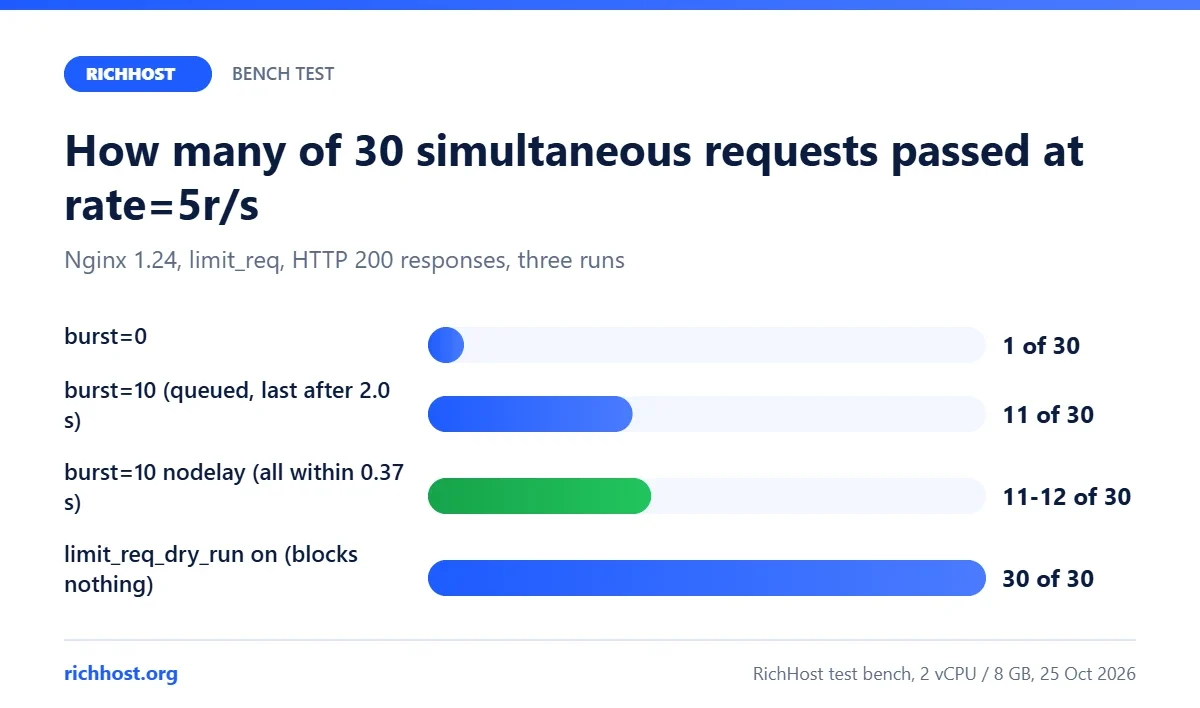
What this shows:
burst=0breaks a normal page load. One of 30 simultaneous requests got through. Yet a steady 4 requests per second (below the limit) passed completely: 40 of 40. The problem is not the average rate but the spike every browser produces.burstwithoutnodelayturns the limit into slowness. The same 11 requests passed, but nginx queued them 200 ms apart and the last one was answered after 2 seconds. To a visitor this looks like “the site is slow”.nodelayserves the headroom at once: 11-12 responses within 0.37 s.- Throughput = rate × time + burst. In 10 seconds at 10 r/s, 61 requests passed (5 × 10 + 10 + 1), at 20 r/s, 63. Anything above that always gets 429, however much you send.
limit_req_dry_run(nginx 1.17.1+) is a safe start. Nothing is blocked, but error.log shows who the rule would have hit.
This is what an nginx 429 looks like on the wire and in the log (the delaying request line is logged one level lower, at warn, so with the usual error_log ... error you will not see it):
$ curl -si http://127.0.0.1:8429/b0/
HTTP/1.1 429 Too Many Requests
Server: nginx/1.24.0 (Ubuntu)
Content-Type: text/html
Content-Length: 178

<html><head><title>429 Too Many Requests</title></head> ...

# R20_error.log
[error] limiting requests, excess: 0.900 by zone "r20_b0", client: 127.0.0.1, request: "GET /b0/ HTTP/1.1"
[warn]  delaying request, excess: 0.990, by zone "r20_b10", client: 127.0.0.1, request: "GET /b10/ HTTP/1.1"
[error] limiting requests, dry run, excess: 10.455 by zone "r20_dry", client: 127.0.0.1, request: "GET /dry/ HTTP/1.1"
To see in the access log who gets 429 and on which pages, awk '$9 == 429 {print $1}' access.log | sort | uniq -c | sort -rn | head is enough. It pays to catch such spikes early with hosting monitoring; for tuning nginx and PHP see server configuration.
Retry-After in nginx: how to add it and two traps
As shown above, nginx does not send Retry-After by default, and the ngx_http_limit_req_module docs do not mention it. You can add it with error_page and a named location. The tested version:
location /ra/ {
  limit_req zone=r20_ra burst=10 nodelay;
  error_page 429 = @too_many;
  proxy_pass http://127.0.0.1:8080/;
}
location @too_many {
  default_type application/json;
  add_header Retry-After 1 always;     # without always the header is not sent with 429
  return 429 '{"error":"too_many_requests","retry_after":1}\n';
}

$ curl -si http://127.0.0.1:8429/ra/    # during a burst
HTTP/1.1 429 Too Many Requests
Content-Type: application/json
Content-Length: 46
Retry-After: 1

{"error":"too_many_requests","retry_after":1}
Trap one: add_header Retry-After 1; without always in the same location as the limit. On the bench the 429 came without the header: nginx adds it only to 200, 201, 204, 206, 301, 302, 303, 304, 307 and 308. Trap two: return 200 in a location with limit_req. We first built the test API that way and got 20 of 20 responses with 200 instead of the expected 3: return runs in the rewrite phase, before limit_req, so the limit never fires. Serve a file, a proxy or PHP and the limit works.
Two more rules from practice: exclude your office and monitoring from counting (with geo and map producing an empty key, nginx does not count such requests), and behind Cloudflare restore the real IP (set_real_ip_from for Cloudflare ranges and real_ip_header CF-Connecting-IP), otherwise a “per IP” limit hits all visitors at once.
Where 429 comes from in WordPress
WordPress core does not send 429 for normal pages, the REST API or login. We checked on the bench: 10 failed logins in a row on wp-login.php returned 10 × 200, and 10 requests to /wp-json/wp/v2/posts also returned 10 × 200. So core has no brute-force protection; plugins or the server provide it (see 5 server security holes).
The only place in core 6.7.2 where WordPress itself returns 429 is comment flood protection (wp-includes/comment.php): a second comment from the same IP or email within 15 seconds (wp_throttle_comment_flood). Administrators and moderators are exempt, and the REST API returns the same comment_flood error with status 429. Bench result, three comments 2 seconds apart:
POST /wp-comments-post.php  -> HTTP/1.1 302 Found   (comment accepted)
POST /wp-comments-post.php  -> HTTP/1.1 429 Too Many Requests
POST /wp-comments-post.php  -> HTTP/1.1 429 Too Many Requests
<p>You are posting comments too quickly. Slow down.</p>
WooCommerce 11.2.1 has rate limiting for the Store API (block-based cart and checkout). From src/StoreApi/Utilities/RateLimits.php and Authentication.php:
- it is off by default (
ENABLED = false); once enabled with thewoocommerce_store_api_rate_limit_optionsfilter, the limit is 25 requests per 10 seconds; - a separate
rate_limit_checkoutfeature limits POST to/wc/store/checkoutto 3 requests per 60 seconds; - the response is 429 with code
rate_limit_exceededand the headersRateLimit-Limit,RateLimit-Remaining,RateLimit-ResetandRateLimit-Retry-After. Note that there is no standardRetry-After, so a client looking for that header will miss the hint; proxy_supportis off by default: behind Cloudflare or another proxy all shoppers share one counter.
When an external API returns 429: retries with backoff, jitter and Retry-After
If your site or script gets 429 from Google, Telegram or a model API, retrying immediately is pointless: you only extend the block. The right pattern is to wait as long as Retry-After asks (per RFC 9110, section 10.2.3, June 2022, it is a number of seconds or an HTTP date) and, without the header, to grow the pause exponentially with random jitter so parallel workers do not retry in lockstep. The core of the tested script:
// Node.js 18+; full file R20_backoff.mjs
function retryAfterMs(h) {               // RFC 9110: seconds or HTTP date
  if (!h) return null;
  if (/^\d+$/.test(h.trim())) return Number(h) * 1000;
  const d = Date.parse(h); return isNaN(d) ? null : Math.max(0, d - Date.now());
}

async function fetchWithBackoff(url, { retries = 8, baseMs = 250, capMs = 8000 } = {}) {
  for (let attempt = 0; ; attempt++) {
    const res = await fetch(url);
    if (res.status !== 429 && res.status !== 503) return res;
    if (attempt >= retries) return res;                  // give up, caller decides
    const ra = retryAfterMs(res.headers.get('retry-after'));
    const backoff = Math.random() * Math.min(capMs, baseMs * 2 ** attempt); // full jitter
    const wait = ra !== null ? ra + Math.random() * 250 : backoff;          // server hint wins
    await res.body?.cancel();
    await new Promise(r => setTimeout(r, wait));
  }
}
Test: 5 parallel workers with 4 requests each (20 requests) against a test API limited to 2 r/s with burst=2. The theoretical minimum for 20 requests is about 8.5 seconds. A log excerpt and the totals of three runs:
 0.05s w3 429 attempt 1, Retry-After=1, wait 1101 ms
 0.05s w4 429 attempt 1, Retry-After=1, wait 1125 ms
 1.15s w3 429 attempt 2, Retry-After=1, wait 1221 ms
 ...
BACKOFF: 20 ok, 0 failed, 27 retries,  9.26s

NAIVE: 3 ok, 17 failed, 0 retries, 0.06s| Client | Succeeded of 20 | Retries | Time |
|---|---|---|---|
| No retries | 3 (all three runs) | 0 | 0.06-0.08 s |
| Backoff + Retry-After, up to 6 retries | 19, 19, 20 | 25-29 | 8.1-9.5 s |
| Backoff + Retry-After, up to 8 retries | 20, 20, 20 | 26-27 | 9.1-9.3 s |
| Backoff only (server without Retry-After), up to 8 retries | 20, 20, 20 | 47-49 | 8.7-11.5 s |
Takeaways: without retries 85% of requests are lost; with Retry-After there are half as many retries as with “blind” backoff, and the total time is close to the theoretical minimum. Six retries are sometimes not enough for five parallel workers (one loss in two of three runs), so either allow more attempts or cap concurrency at the API quota. For Telegram Bot API read the pause from parameters.retry_after in the JSON body, for WooCommerce from RateLimit-Retry-After. In bash, curl --retry 5 does the same: it treats 429 as a transient error and honours Retry-After since version 7.66.0.
429 and search crawlers
According to Google’s documentation, a 429 tells Googlebot the server is overloaded: crawling slows down temporarily, and if the error persists, indexed URLs are eventually dropped. So never rate-limit the real Googlebot (verify it by reverse DNS, not by User-Agent). If ordinary visitors get 429 en masse on virtual hosting, check the plan limits as well: resource overuse there often looks similar.
Sources (checked 25 Oct 2026)
- RFC 6585, section 4: definition of 429, April 2012.
- RFC 9110, section 10.2.3 Retry-After: June 2022.
- nginx: ngx_http_limit_req_module,
limit_req_status(1.3.15, default 503),limit_req_dry_run(1.17.1),delay(1.15.7). - Cloudflare changelog, 12 Mar 2026:
Retry-Afteron 1xxx errors, including 30 s for 1015. - Google: how HTTP status codes affect crawling.
- Source code of WordPress 6.7.2 (
wp-includes/comment.php) and WooCommerce 11.2.1 (src/StoreApi).
FAQ
How is 429 different from 503?
429 is about one client’s pace: “you are sending too much”. 503 means the whole server is unavailable or overloaded. nginx returns 503 by default when a limit fires, so set limit_req_status 429 explicitly.
What burst value should a site use?
Not zero. A page with dozens of files produces a burst of requests, and in our test burst=0 rejected 29 of 30. For pages, start with burst around the number of files per page plus nodelay (better still, do not limit static files at all), and give wp-login.php and xmlrpc.php a separate strict zone. Turn on limit_req_dry_run first and read the log.
Will changing my IP help?
If you were caught by a shared address (VPN, office), turning off the VPN often solves it. But the rule may count a cookie or an account, and trying to get around it only extends the block.
If you are choosing where to host a site, see the RichHost hosting plans: NVMe disks, unlimited traffic, our own control panel with an AI assistant and free Let’s Encrypt SSL.


