


Shared hosting (also called virtual hosting) is a service where one server runs the websites of many customers. Each customer gets a separate account with its own files, databases, mailboxes and resource limits, while the provider runs, patches and secures the server itself. It is the cheapest and simplest way to host a typical website, as long as you do not need root access or your own background services.
If you are new to the topic, start with what web hosting is. This guide goes one level deeper: how a shared server is actually divided, what the limits mean in practice, what you can and cannot do, and how to tell when you have outgrown a plan.
How one server is shared between accounts
On a shared server every customer is a separate Linux user. The control panel creates that user, a home directory and, for each website, a web server configuration called a virtual host. That is where the name comes from: the Apache documentation defines virtual hosting as running more than one website on a single machine, usually many domain names on one IP address. Four mechanisms decide how much of the server you really get.
1. A separate account and file space
Your files live in your home directory and belong to your user. Other customers cannot read them, and your disk quota usually counts website files, databases and mail together.
2. PHP-FPM pools
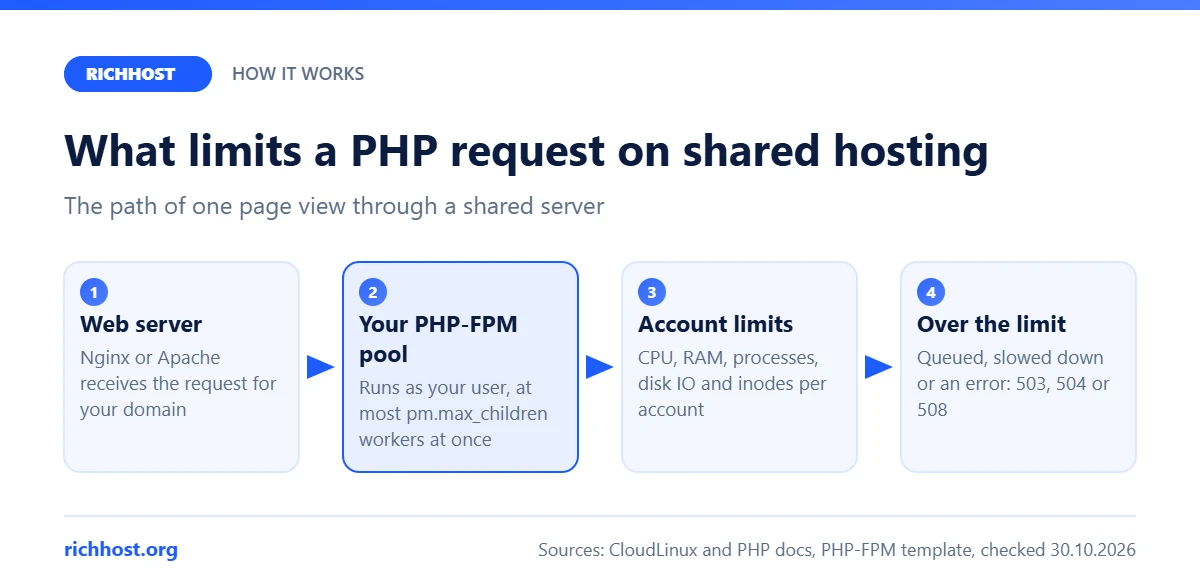
Most PHP sites are executed by PHP-FPM, the FastCGI process manager. The PHP manual describes it as a way to run several pools of processes with different settings. On shared hosting each account, or each domain, gets its own pool that runs as that account’s user. The pool caps how many PHP requests can run at the same moment with pm.max_children; extra requests wait in a queue. Here is an excerpt of a typical default pool template from a hosting control panel (the open_basedir line is shortened):
[%backend%]
listen = /run/php/php%backend_version%-fpm-%domain%.sock
user = %user%
group = %user%
pm = ondemand
pm.max_children = 8
pm.max_requests = 4000
pm.process_idle_timeout = 10s
php_admin_value[open_basedir] = /home/%user%/web/%domain%/public_html:/home/%user%/tmp:/tmp
Read it like this: one pool per domain, running under the customer’s own user; PHP workers start only when requests arrive and stop after 10 seconds of idle time; at most 8 run at once; and open_basedir keeps PHP scripts inside the account’s own folders. These are the panel’s upstream defaults, not a promise about any particular host, because providers tune the numbers per plan. Eight workers can serve far more than eight visitors, since a cached page is generated in a fraction of a second. The queue grows when pages are slow: heavy plugins, uncached pages, slow database queries or calls to external APIs.
3. Per-account resource limits
Many hosts add kernel-level limits for every account. The best known implementation is CloudLinux LVE, which is built on Linux cgroups; other setups use plain cgroups or similar tools, but the knobs are much the same:
- CPU: a share of processor time, often expressed as a percentage of one core. When you reach it, the site does not crash, it slows down.
- Physical memory: the RAM used by all your processes together. When it runs out, processes are killed and visitors usually see 500 or 503 errors.
- Entry processes: how many requests can enter your account at the same time. On CloudLinux, hitting this limit returns error 508 “Resource Limit Reached”.
- Number of processes: all processes and threads, including cron jobs and SSH sessions.
- Disk IO and IOPS: read and write throughput and operations per second, so a backup script in one account does not stall the disk for everyone else.
4. Disk quota and inodes
Besides gigabytes, the file system counts inodes: one inode for every file or folder. A WordPress site with a page cache, several thumbnail sizes for every image and mailboxes that store each message as a separate file can reach tens of thousands of files while using little space. Some hosts cap the number of inodes (CloudLinux applies this limit through disk quota), so check that number as well as the gigabytes.
If you already see these errors, our guides to the 503 Service Unavailable error and to raising the PHP memory_limit show how to find the cause in the logs.
What you get and what you cannot do
A shared plan is a managed service: the provider installs, updates and monitors the operating system, the web server, PHP, the database server and mail. You manage your sites through a hosting control panel. A typical plan includes:
- websites and domains, each with its own folder and settings;
- MySQL or MariaDB databases;
- email accounts on your own domain;
- FTP or SFTP access and a file manager;
- scheduled tasks (cron);
- free SSL certificates and a choice of PHP version.
What you usually cannot do on shared hosting:
- No root or sudo. You cannot install system packages, change server-wide settings or load kernel modules.
- No custom daemons. Long-running processes that listen on their own port, such as a Node.js server, a bot that polls an API around the clock or your own Redis or Elasticsearch, are stopped by process limits or by the host’s rules.
- No own web server or PHP build. You change settings only through the panel,
.htaccessfiles (on Apache) or.user.inifiles. - No long jobs in the browser. PHP requests are cut off by
max_execution_timeand the pool’s timeouts, so video encoding or imports that take hours belong elsewhere. - No firewall or network changes. Ports, firewall rules and routing belong to the provider.
Who shared hosting fits and when to move on
Shared hosting is the right fit for company and brochure sites, landing pages, blogs, WordPress sites with caching, small online stores, portfolios, email on your own domain and agencies that keep several small client sites in one account. For these projects the limits above are rarely the bottleneck; slow plugins and missing caching are.
It is time to move on when:
- you hit CPU, memory or entry process limits at normal traffic, not just during a one-off spike, and a bigger plan no longer helps;
- you need root access, a custom stack (Node.js, Python application servers, Docker), WebSockets or background workers;
- you need to tune the server itself: your own Nginx configuration, Redis for sessions, PHP extensions the host does not offer;
- a contract or regulation requires a server that is not shared with other customers.
The first step is usually a bigger plan with the same host. The next step is a VPS. RichHost does not sell VPS or dedicated servers, so at that point you will need a VPS from another provider. When you switch, plan the move carefully so you can move the site without downtime.
How to evaluate a shared hosting plan
Marketing pages tend to show the same list of features. These questions reveal the real differences between plans and providers:
- Resource limits. Are CPU, RAM and process limits published as numbers? “Unlimited” usually refers to traffic or sites, never to CPU.
- Inodes. Is there a cap on the number of files, and does it include mail?
- Storage. NVMe or older SSD, and does the disk quota include databases and mailboxes?
- PHP. Can you choose the PHP version per site? What are the default
memory_limitandmax_execution_time? - Backups. How often, how long they are kept, and can you restore a single site or file yourself?
- SSL. Free Let’s Encrypt certificates with automatic renewal should be standard.
- Location. Choose servers close to your visitors and measure ping and TTFB to the provider’s test IP or demo site from your audience’s region.
- Price over time. Compare the renewal price, not just the first-year promo. Our web hosting cost guide lists checked, dated prices of several providers.

Shared vs VPS vs cloud vs dedicated
| Parameter | Shared hosting | VPS | Cloud hosting | Dedicated server |
|---|---|---|---|---|
| What you rent | An account on a server run by the provider | A virtual machine with fixed resources | Virtual resources billed by usage | A whole physical server |
| Root access | No | Yes | Yes, on cloud servers | Yes |
| Who maintains the OS | The provider | You, unless it is managed | You or the provider, depending on the service | You, unless it is managed |
| Isolation | Per-account limits; kernel and disk are shared | Own kernel and reserved RAM on shared hardware | Like a VPS, plus separate instances | Full: no neighbours |
| Scaling | Move to a bigger plan | Resize the machine, often with a reboot | Add resources or instances on demand | New hardware or more servers |
| Skills needed | Panel, FTP, CMS | Linux administration | Linux plus cloud tooling | Linux administration and hardware planning |
| Typical cost | Lowest | Higher | Depends on usage | Highest |
| Best for | Sites, blogs, small stores, email | Custom stacks, applications, bots | Variable or fast-growing load | Large or compliance-heavy projects |
Security isolation basics
On a well configured shared server, isolation between customers rests on several layers:
- Separate users and file permissions. Your files belong to your user. The usual baseline is 644 for files and 755 for folders; 777 is never needed.
- PHP runs as your user in your own pool. A compromised site in another account cannot write to your files, and with
open_basedirPHP scripts cannot even read outside the allowed folders. - A virtualized file system on some hosts. CloudLinux CageFS is one example: each user sees only their own files and a limited set of system tools, not the other users on the server.
- Resource limits. They stop one hacked or overloaded account from taking the whole server down.
Two things stay your responsibility. First, the sites inside your own account usually run as the same user, so one infected site can infect the others next to it: keep the CMS, themes and plugins updated and delete old installs you no longer use. Second, accounts: use strong unique passwords and two-factor login for the panel and the site admin area, and serve every site over HTTPS (see SSL certificates on shared hosting). Shared IP addresses add one more shared risk: if a neighbour sends spam, the reputation of the IP can suffer, which is why SPF, DKIM and DMARC records on your domain matter.
RichHost shared hosting in brief
RichHost is an international hosting provider working since 2003, with servers in Europe and the USA. It sells shared hosting and domains only: plans A3 ($8/mo), A5 ($10), A10 ($13), A20 ($20), A30 ($35) and A50 ($65), with 10% off for yearly payment. All plans run on NVMe disks with unlimited traffic, unlimited sites, mailboxes and FTP accounts, our own control panel with an AI assistant and free Let’s Encrypt SSL. You can compare them on the hosting plans page. RichHost does not sell VPS or dedicated servers: if your project needs root access, choose a VPS from another provider.
How we checked
Sources checked on 30.10.2026: the CloudLinux OS documentation on LVE limits (SPEED, PMEM, EP, NPROC, IO, IOPS, inodes, error 508) and CageFS; the PHP manual on PHP-FPM configuration (pools, pm modes, pm.max_children); the Apache HTTP Server documentation on virtual hosts. The pool values above are upstream defaults, not measurements of RichHost servers. RichHost plan facts come from our plans page.
FAQ
Is shared hosting the same as virtual hosting?
Yes. Both names describe one server that hosts many customers’ sites. “Virtual hosting” comes from the web server term virtual host: many domains served by one machine, often from one IP address.
Can I run Node.js or a bot on shared hosting?
Only if the host explicitly supports it, for example through an application manager in the panel. A process that runs around the clock or listens on its own port is normally stopped on shared hosting; for that you need a VPS.
Will a neighbour’s site slow mine down?
Per-account CPU, memory and IO limits make that much less likely, but the disk, network and IP address are still shared. Good hosts keep servers below full load and watch the reputation of their IP addresses.
How do I know I have outgrown shared hosting?
Look for regular 503 or 508 errors and CPU or memory limits being reached in the panel statistics at normal traffic. Optimize first (caching, fewer plugins, lighter pages), then try a bigger plan; move to a VPS when you need root access or software the host cannot run.


